들어가며
다음으로는, 설정 파일을 읽고, 현재 요청에 대한 사용자 정보를 조회하는 방법을 알아보도록 하겠습니다. API를 호출할 때, 내 정보를 같이 넘기게 해서, 이를 통해 사용자에 대한 상세 정보를 알 수는 있겠으나, 이렇게 하면 Client 쪽에서의 위변조를 통해 요청하는 사용자를 다른 사람으로 바꿔치기 할 가능성이 있습니다. (보안적으로도 해결이 가능한 부분이긴 합니다)
그렇지만, 이렇게 매번 Call 마다 사용자 정보를 포함하게 하는 것은 사용성 측면에서 매우 비효율적이고, 관리 주체가 서버가 되지 않고 Client 에서 준 정보를 무조건 믿어야 하는 점을 보면 제대로 된 방법은 아닙니다. 결과적으로는 현재 서버가 내어 준 Session 정보를 토대로 하여 사용자 정보가 무엇인지를 가져오는 것이 더욱 좋은 방법이라고 할 수 있습니다.
여기서는 이러한 사용자 정보를 어떻게 관리하는지 부분에 대해 알아보고, 설정 파일(application.properties, appication.yml 등)을 통해서 알아낸 정보들을 꺼내어 쓰고자 할 떄 어떻게 꺼내는지 알아봅니다.
구현하기
Controller 구현하기
이번 작업에서는 아래와 같이 Controller 를 만들어 두고 설명을 시작하겠습니다. 우선 아래와 같은 Controller 를 하나 만들어둡니다.
1
2
3
4
5
6
7
8
9
10
11
12
13
14
15
16
17
18
19
20
21
22
23
24
25
26
27
28
29
30
31
32
33
34
35
36
37
38
39
40
41
42
43
44
45
46
47
48
49
50
51
52
53
54
55
56
57
58
package com.simplify.sample.property.controller;

import org.slf4j.Logger;
import org.slf4j.LoggerFactory;
import org.springframework.beans.factory.annotation.Value;
import org.springframework.security.core.annotation.AuthenticationPrincipal;
import org.springframework.stereotype.Controller;
import org.springframework.web.bind.annotation.RequestMapping;
import org.springframework.web.bind.annotation.ResponseBody;

import com.simplify.sample.security.domain.SecurityMember;

@Controller
public class PropertyController {

    private Logger LOGGER = LoggerFactory.getLogger(PropertyController.class);

    @Value("${logging.path}")
    private String logging_path;

    @RequestMapping("/openapi/getProperty")
    public @ResponseBody String getProperty(@AuthenticationPrincipal SecurityMember securityMember) {

        StringBuffer sb = new StringBuffer();

        if(securityMember != null) {
            sb.append("securityMember.getIp()=")
                .append(securityMember.getIp())
                .append(" / ");
        }else {
            sb.append("securityMember is null / ");
        }
        sb.append("logging_path=")
            .append(logging_path);

        LOGGER.debug(sb.toString());

        return sb.toString();

    }

    @RequestMapping("/getMember")
    public @ResponseBody String getMember(@AuthenticationPrincipal SecurityMember securityMember) {

        StringBuffer sb = new StringBuffer();

        if(securityMember != null) {
            sb.append("securityMember.getIp()=")
            .append(securityMember.getIp());
        }

        LOGGER.debug(sb.toString());

        return sb.toString();

    }

}
/openapi/getProperty
-
@ResponseBody 로 String 형태로 답을 줍니다. 즉 화면 이동이 있지 않고(jsp, ModelAndView, 등) API호출인 것 처럼 그대로 문자열을 response 해 주는 것입니다.
-
/openapi/** 로 시작하였으므로, 앞서 SecurityConfig 에서 정의해 둔 것 처럼 인증 처리를 거치지 않고 API 호출이 가능합니다.
-
function 에 들어오는 parameter 중 앞서 SecurityConfig 에서 User 상속받았던 객체를 @AuthenticationPrincipal annotaion을 붙여 넣어줍니다. 이렇게 되면 저 정보는 Spring 에서 자동으로 autowired 되어 들어오게 됩니다.
-
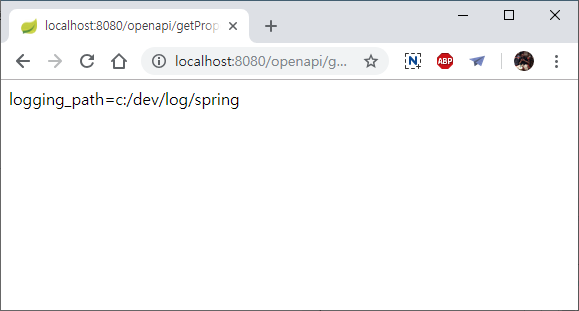
앞에서는 SecurityMember 가 있는지 확인하고 있으면 그 ip 정보를 문자열에 넣어줍니다. 또한 application.yml 에 선언된 값 중에서 logging.path 정보를 가져와 return 할 문자열에 포함시킵니다.
1
2
3
logging:
  path: c:/dev/log/spring
  file: log-file
결과적으로, 사용자 정보를 가져오지는 못합니다. 이유는, openapi 로 시작한 것은 인증을 하지 않는 것으로 정의했고, 그렇게 되면 인증된 사용자 정보 역시 넣어주지 않기 때문입니다.
/getMember
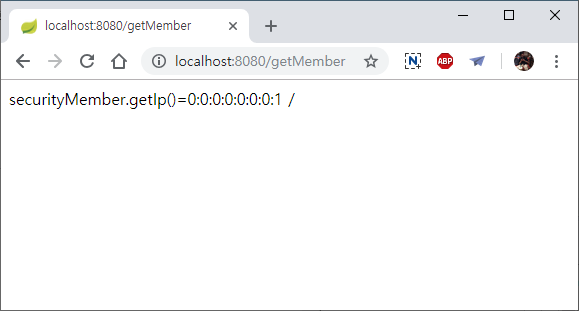
- 앞선 /openapi/getProperty 와 유사하게 동작하지만, URI 가 /openapi/** 로 시작하지 않습니다.
/getMember 를 호출하게 되면, 로그인 화면으로 이동하고 로그인을 완료하면 사용자 정보가 올바르게 나타납니다.
GitHub 소스 위치 : https://github.com/Simplify-study/SpringBootSample.git
출처: https://4urdev.tistory.com/43 [Simplify]